
16-ysyThread-Banner 自定义规范
Banner 自定义规范
为什么要打印 Banner?
1. 品牌标识与框架认知
Banner 就像是框架的”身份证”,它在应用启动的第一时间向开发者宣告:”我来了!”
2. 实用价值:版本管理与问题排查
版本信息展示
在生产环境中,快速确认框架版本对于问题排查至关重要,可以通过日志快速定位版本信息
启动状态确认
Banner 的成功打印意味着框架的核心组件已经正确初始化
3. 社区建设与开源文化
通过 Banner 展示项目地址和官网链接
Banner 组件设计与实现
核心实现解析
Banner 内容设计
patorjk.com 在线生成 Banner
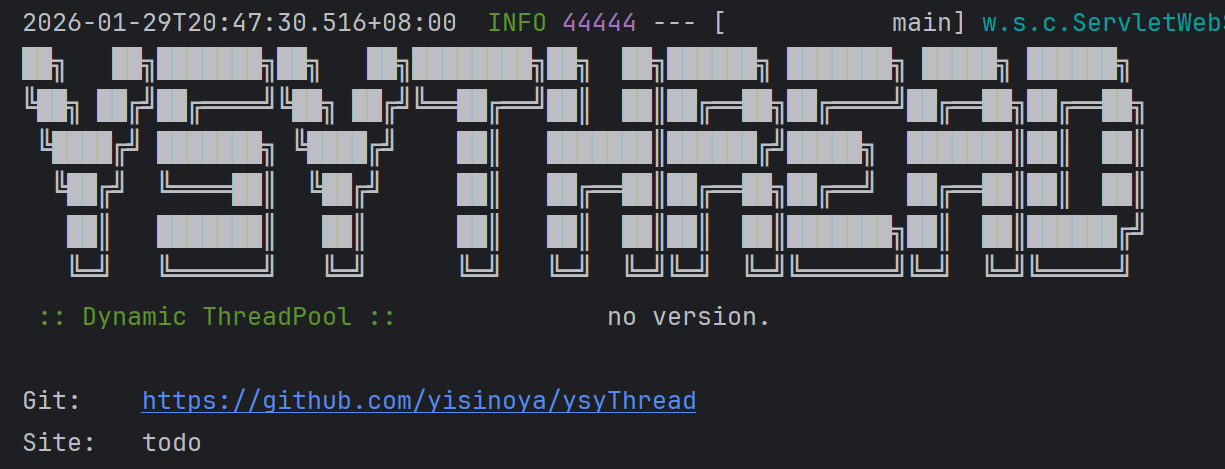
ps:为什么版本信息为空,下述会讲到
版本信息处理
1 | public OneThreadBannerHandler(BuildProperties buildProperties) { |
版本信息的获取策略:
- 优先使用 BuildProperties:从
Maven/Gradle构建信息中获取准确版本- 降级处理:如果无法获取版本信息,显示”
no version.”- 格式统一:版本号统一格式为”
(v1.0.3)“
自动配置集成
YsyThreadBannerHandler 实现了InitializingBean接口,使用了初始化事件绑定,自然需要自动装配
1 | public class YsyThreadBannerHandler implements InitializingBean{ |
为什么项目启动版本号显示 no version?
原因是 BuildProperties 没有成功注入,导致 version 为空
Spring Boot 里 BuildProperties 的来源是 spring-boot-maven-plugin 在打包时生成的 META-INF/build-info.properties 文件,它默认不会生成,得在common-spring-boot-starter 的 pom.xml 里加上
1 | <build> |
这个 Maven 插件的生命周期绑定的是 compile 阶段,必须要执行下 compile、package 或者 install 等才会有这个信息
本博客所有文章除特别声明外,均采用 CC BY-NC-SA 4.0 许可协议。转载请注明来源 涯思构码·易思涯!
相关推荐

2025-12-24
1-ysyThread-为什么需要动态线程池?
为什么需要动态线程池?线程池通用痛点分析 从【定义、配置、运行、监控、销毁】全生命周期来分析 1. 规划与定义阶段:缺乏治理 痛点:开发人员各自为战,随意定义线程池参数,缺乏统一的管控标准 后果:系统内线程资源泛滥,在高并发下引发服务器负载过高,甚至导致应用崩溃 2. 配置与调优阶段:静态僵化 痛点:线程池参数通常是硬编码或静态配置,难以评估合理值 后果:参数设置过小导致吞吐量不足,设置过大浪费资源。且在业务流量波动时,无法动态调整,故障风险高 3. 运行与稳定性阶段:级联影响 痛点:面对突发流量,容易出现队列积压、任务执行超时或触发拒绝策略 后果:直接影响既有业务的正常响应,严重时导致业务熔断或不可用 4. 监控与运维阶段:观测缺失 痛点:缺乏可视化的运行指标(活跃度、队列剩余量等)及报警机制 后果:系统出现问题时(如超时、卡顿),无法第一时间确认是否为线程池瓶颈,排查效率低,故障定位难 5....

2026-01-18
11-ysyThread-动态线程池监控
动态线程池监控 仅靠“事发时的告警”远远不够。没有监控,开发人员排查问题只能靠猜,做性能调优也没底 所以强调,线程池监控不是只为了报警,它更重要的价值在于 辅助定位问题 :出故障时,能看到是线程数打满了,还是队列堆积了 支持容量规划 :通过长期趋势判断线程池配置是否合理 洞察系统瓶颈 :比如是否存在某些任务执行时间异常拉长,影响整体调度效率 本地日志监控实现1. 定时任务调度机制本地日志监控的核心是定时任务调度机制 2. 本地日志输出实现本地日志监控的实现相对简单,但需要确保 日志格式的规范性和可读性: 12345private void logMonitor(ThreadPoolRuntimeInfo runtimeInfo) { log.info("[ThreadPool Monitor] {} | Content: {}", runtimeInfo.getThreadPoolId(), ...

2026-01-16
10-ysyThread-告警频率限制方法
告警频率限制方法前言当系统出现异常时,往往会在短时间内产生 大量重复告警,形成所谓的”告警风暴“。这不仅会对开发人员造成信息过载,还可能导致真正重要的告警被淹没在噪音中 为了解决这个问题,需要设计一套实用的告警限流机制 ,既要保证重要告警能够及时送达,又要避免无意义的重复通知 告警风暴问题分析在线程池监控场景中,告警风暴通常出现在以下情况: 队列积压告警 :当任务提交速度超过处理能力时,队列长度持续增长,可能每秒触发多次告警 拒绝策略告警 :线程池达到最大容量后,每个被拒绝的任务都可能触发一次告警 线程数异常告警 :活跃线程数超过阈值时,监控系统可能频繁发送通知 告警风暴会带来以下负面影响: 信息过载 :运维人员被大量重复信息淹没,难以快速定位问题 资源浪费 :频繁的网络请求消耗系统资源,影响正常业务 告警疲劳 :过多无效告警导致运维人员对告警系统失去信任 成本增加 :第三方通知服务(如钉钉、企业微信)按调用次数收费 解决方案核心思想是:在保证告警时效性的前提下,通过时间窗口限流算法控制同类型告警的发送频率 具体策略包括: 按线程池 ID 和告警类型进行分组...

2026-01-20
12-ysyThread-Micrometer监控的原理与误区
Micrometer监控的原理与误区Metrics 注册原理1. 基于首次注册对象引用获取指标先来看看这行代码的实际作用: 1Metrics.gauge(metricName("xxx"), tags, runtimeInfo, ThreadPoolRuntimeInfo::getXxx); 这行代码背后的执行逻辑是这样的: 如果这个 metric(包括名字 + tag)是第一次注册 ,Micrometer 会绑定 runtimeInfo 对象的引用 如果 metric 已经注册过了,这次调用不会更新引用 ,只是返回已存在的 Gauge(Micrometer 内部维护了一个缓存结构) 因此,即使后续你传入了新的 runtimeInfo 对象,但这个新对象并不会被绑定,Micrometer 仍然会读取最初绑定的老对象的引用值 第一次传入的runtimeInfo1被绑定后,之后无论你传入runtimeInfo2、3、4,Micrometer都会忽略,只会继续读取runtimeInfo1的字段值 2. 注册的 Metric...

2026-01-26
14-ysyThread-回调函数方式防线程池任务丢失
回调函数方式防线程池任务丢失传统线程池关闭的痛点分析1. 任务丢失风险首先是时间竞争问题,JVM 关闭和任务执行之间存在时间竞争,任务可能来不及完成就被强制终止了。其次是资源浪费,已经投入的计算资源和业务逻辑处理可能前功尽弃。最严重的是数据一致性问题,对于涉及数据跑批等任务,强制中断可能导致数据不一致 2. 手动管理的复杂性在 Spring 应用中,正确管理线程池的生命周期 需要开发者手动处理: 123456789101112131415161718192021222324252627282930@Componentpublic class TaskService { private ThreadPoolExecutor executor; @PostConstruct public void init() { executor = new ThreadPoolExecutor( 5, 10, 60L, TimeUnit.SECONDS, new...

2026-01-22
13-ysyThread-Prometheus 与 Grafana 配置
Prometheus 与 Grafana 配置Prometheus 介绍1. 什么是 Prometheus?Prometheus 是一个开源的系统监控和告警工具包 2. 特性 Prometheus 的主要特性包括: 一个多维数据模型,其中时间序列数据由指标名称和键/值对标识 PromQL,一种灵活的查询语言,用于利用这种多维性 不依赖分布式存储;单个服务器节点是自主的 时间序列收集通过 HTTP 上的拉取模型进行 通过中间网关支持推送时间序列 通过服务发现或静态配置发现目标 支持多种图形和仪表盘模式 3. 什么是指标(Metric)?指标在通俗意义上是数值测量,术语“时间序列”是指随时间记录的变化。用户希望测量的内容因应用程序而异。 对于 Web 服务器,可能是请求时间; 对于数据库,可能是活动连接数或活动查询数等等。 4. 架构 Prometheus 从 已埋点的作业中抓取指标,可以直接抓取,也可以通过中间推送网关抓取短生命周期作业的指标。它将所有抓取的样本 存储在本地,并根据这些数据运行规则,以聚合并记录现有数据中的新时间序列或生成告警。Grafana...